You will get hacked soon, and that is a fact
How prepared are you for the minute right after it happens? The definitive guide for every software engineer.
This article is an English translation of the original article written in Portuguese, you can find it here.
How prepared are you for the minute right after it happens? The definitive guide for every software engineer.
It is no secret to any engineer that we have been eating security incidents for breakfast, one day after the other. Today, as I write this, I have three news stories open in my tabs, and all three say the same thing in different ways. I will tell you about the three and then hand you a recipe, from someone who has lived through this in practice a few times in life and who, by the look of it, is going to live through it a lot more from now on.
Today’s breakfast
The first one is PHP. Today the PHP team published a security advisory asking everyone to update immediately: versions 8.5.12, 8.4.27, 8.3.36 and 8.2.35 fix two critical vulnerabilities (CVE-2026-109618 and CVE-2026-109619) that allow unauthenticated remote code execution. The advisory says the risk is highest for mod_php, with a demonstrated exploit where a request without any login triggers the attack before any application code runs. It was found by Wiz Research, and their write-up is the part that made me stop: the flaws are memory bugs in the core of the language, caused by mishandled fatal errors like running out of memory, and they had been there for more than a decade, affecting versions as far back as PHP 5.4. (A decade, huh? I keep wondering how long government security agencies, US, China, Israel, pick your favorite, have known about this and quietly exploited it 👀 #ConspiracyTheory. It’s a joke, ok? I have zero evidence, just a decent sense of humor.) They demonstrated the RCE on the latest container images of WordPress, Drupal and Joomla. The timeline is short: first flaw found on August 19, RCE confirmed on Drupal on the 20th and on WordPress on the 21st, reported to the PHP team on the 24th, public fix only on October 21, 58 days later. Wiz says it used AI models throughout the research (finding the flaw, writing the exploit, validating the patch) and that one researcher did in a week what would previously have taken a team months. That last claim is theirs, not mine, but it shows where the wind is blowing.
The second one is Railway, where I host a good part of my personal projects. The company detected anomalous activity in systems that store customers’ environment variables: an unauthorized third party may have accessed encrypted variables and, in some cases, obtained the decrypted contents (API keys, database credentials, registry credentials). They believe it is part of a series of attacks on platform companies aimed at reaching AI inference providers (that reading is Railway’s, I have no way to confirm it). According to the status page, the investigation started at 07:24 UTC on the 21st, the dashboard, API and CLI went down, builds were paused in every region and, in the last update I read, they were still paused. I have several chained PRs waiting on this, some of them critical, and I already know that once it is released I will have the long job of rotating keys one by one. Meanwhile, the critical PRs sit there in the queue, aging like milk, not like wine.
And here is the trap I want you to see: Railway recommends rotating all variables, but for the new key to work in my service I need a deploy, and deploy is exactly what is blocked. The bucket credential rotation they did themselves fell under the same rule: the new ones show up on their own, but services cannot be redeployed to use them until builds come back. Your incident response plan depends on another company’s pipeline being up, and you have probably never written that down anywhere.
The third one I read a few months ago and it deserves its own section.
The AppsFlyer case
Anyone who is a mobile developer like me has probably dealt with AppsFlyer at some point. It is in a huge number of apps (the company itself talks about around 15 thousand businesses and more than 100 thousand mobile and web apps), doing the dirty work of traffic attribution and integration between the N paid media platforms, abstracting dozens of SDKs we would have to implement by hand, one by one, each with its own rules, which we mobile devs hate with all our might.
In March 2026 the target was not the app, but their Web SDK, the script that websites load from websdk.appsflyer.com. According to BleepingComputer, the mobile SDK was not affected. AppsFlyer says, in its incident FAQ, that it was never breached: what happened was a “domain registrar incident”. Let’s pretend we fully trust what vendors usually say (after all, without trust there would be no human relationship at all), and the account is still serious. cside’s analysis describes that the attacker, through the registrar account, changed the domain’s nameservers from AWS Route 53 to another provider, and from there the traffic for websdk.appsflyer.com started going through their servers. The company’s infrastructure and repositories never needed to be touched.
How was the registrar account compromised? That is not public. AppsFlyer says it restored two-factor authentication on the account, which suggests 2FA had stopped protecting it, but it does not explain how. The classic hypothesis in cases like this is social engineering: convincing the provider’s support (by phone, called vishing, or by email, with a convincing pretext) to hand over control of the account. I am talking about a hypothesis here, not a fact, right? Nobody said that. (My joke guess is that the access was a login created in 2019 by someone who no longer even works there, but that is just my cynical side talking.)
What the attacker delivered in place of the script is the elegant part. It was obfuscated JavaScript with a custom base91 scheme and a table of 786 strings decoded at runtime, which kept the SDK working normally while swapping window.fetch and using a MutationObserver to watch the DOM for crypto wallet addresses (Bitcoin, Ethereum, Solana, XRP and TRON), replacing them with the attacker’s and shipping the original away. (What the hell did you just say, Lukita? In short: it swaps the original wallets for mine. In the attacker’s voice, of course.) Researchers report that it rotated the obfuscation scheme and the wallets, which defeated static signatures. For 99% of sites this went unnoticed. The first alert came from researchers (Profero found the payload on the 9th) and from users complaining on Reddit, according to BleepingComputer.
A site with SRI (the script’s hash in the tag) would have been spared. But the vendor itself asks you not to do that, because you would have to update the hash on every new version, and those scripts change dozens of times a day, with A/B tests and everything. Your marketing team does not want to hear about delays updating that ultra shady script from a website promising a revolutionary free tool either, right? CSP would help less than it seems in this specific case: the hijacked domain was exactly the one you had authorized.
The cool part of all this is that AI is also here for good. The script is the one from the paste that circulated in the Hacker News thread: a single line of 173 thousand characters, fully obfuscated. Its five wallet addresses and two endpoints are exactly the ones Profero published as IOCs, so it is the same attack. If you want to see the script with your own eyes, it is on pastebin, it is safe, I swear (as long as you don’t run it, of course). (And if you can read what it does without help, tell me how, you MONSTER!)
On the day of the incident (also to investigate whether this could affect us in the mobile app, and it is about this readiness that I will explain more deeply in the article) I threw this same script at Gemini and asked what it does. This was the answer (translated from the Portuguese original, otherwise unedited):
Unlike the previous script, which was a legitimate marketing tool (AppsFlyer), this script is malicious (or, at the very least, highly aggressive adware). It is deeply obfuscated code whose main behavior points to an Affiliate Link Hijacker. It was designed specifically to hide its intentions from antivirus software, adblockers and developers who try to read it.
See the full answer
Here is the reverse engineering of what it does under the hood:
1. Deobfuscation Engine (runtime decryption). The whole first half of the script (with variables like AlxhLg6, o57x3o, functions with ^, <<, >>=) is a custom encryption engine. The real strings in the code (like URLs, event names and regular expressions) are not in the text. They are assembled and decoded in memory only at the exact moment the script needs them. This is a classic evasion technique.
2. “Payload” retrieval (C2 payload). The async function p58Xob() makes a silent fetch request to a control server. It downloads a JSON and stores the response variables (e, b, s, x, r) in an invisible global configuration object on window. These variables usually contain the attacker’s updated affiliate IDs.
3. Click Hijacking (Link Hijacking). The core of the attack happens in the final part, where the script adds Event Listeners to the DOM (often listening for click or submit events).
- When the user clicks a link on your site, the script intercepts the action.
- It uses dynamic regular expressions to check whether the destination link belongs to a famous e-commerce site (like Amazon, Shopee, AliExpress, etc.).
- If so, it silently rewrites the URL to inject the attacker’s affiliate code before redirecting the user. That way, if the user buys something, the commission goes to the owner of this malicious script.
4. Deep Network Interception. The code also has heavy structures to intercept the browser’s native APIs (fetch and XMLHttpRequest). It overrides these APIs so it can read and modify network responses in real time, making sure it can inject its codes even in links generated dynamically by modern applications (like React or Angular).
5. Telemetry and Tracking. The function m3hlJy1() is used for spying. Every time it intercepts and successfully alters a link, it bundles the original URL, the timestamp and the fraudulent URL and sends this back, in base64, to the attacker’s server, counting how many commissions they stole.
Bottom line: if you found this script on your site, you suffered a code injection. This usually happens through a compromised third-party plugin, an infected NPM package (supply chain attack) or an XSS vulnerability. Would you like help with strategies to track down the origin of this code injection in your project?
Convincing, right? Well written, full of certainty, and almost entirely wrong where it matters. It got right what you can see without decoding anything: there is a runtime deobfuscation engine, a function (p58Xob) that fetches configuration from a server, interception of fetch and XHR, and a telemetry function (m3hlJy1). It got wrong everything the strings hide. Side by side with what is in the file:
| What Gemini said | What is in the file |
|---|---|
| Hijacks e-commerce affiliate links (Amazon, Shopee, AliExpress) | Swaps crypto wallet addresses. The only URLs in the file are websdk.appsflyer.com/v1/api/... |
Listens for click or submit events | Listens for input and paste on wallet address fields, and intercepts fetch and XHR |
e, b, s, x and r are affiliate IDs | They are wallet addresses: Ethereum, Bitcoin, Solana, XRP and Tron |
| Base64 telemetry, with the fraudulent URL | XOR with the key "ass", with the victim’s original address, and it never even gets sent because of undeclared variables |
| Probable injection on your site (plugin, NPM or XSS) | The victim’s site did not need to be touched: the vendor’s domain was what got hijacked |
(The analyses published by cside and Profero also talk about swapping crypto wallets, not affiliate links.) The worst part is the last one: Gemini would send you looking for a plugin, an NPM package or an XSS on your site, when the problem was the vendor’s domain. A confident and wrong answer at the impact step is what makes you spend the first hour of the incident looking in the wrong place.
Then I took the same script and gave it to Claude. And before anyone yells: it is not a fair comparison. Gemini was a model from March, and the Claude that answered now is a current model (Claude Sonnet 5.5), used seven months later. On top of that, Gemini got the text in a conversation, while Claude Code got the file, wrote a decoder for the string table and read the result (nothing in the script was executed, only read). The lesson is not about brands: it is that, without decoding the strings, a model is guessing the meaning from names and structure. This was the answer:
Short answer: it is a cryptocurrency clipper that runs in the browser. It swaps wallet addresses (Bitcoin, Ethereum, Solana, XRP and Tron) for the attacker’s in two places: in form fields the person types or pastes into, and in the fetch and XHR requests the page itself sends. The type of attack is supply chain: the script was not planted on the victim’s site, it was delivered by a trusted domain (websdk.appsflyer.com) that the attacker controlled.
See the full analysis
1. The obfuscation (what you see if you open the file). There are five layers. First, strings live in tables encoded with a custom base91, using 73 different shuffled alphabets (one per scope), decoded only at the moment of use and cached: no API name like fetch, replace or MutationObserver shows up as text, it becomes something like iVp0dU7(693). Second, a table of 318 numeric constants (AlxhLg6[12] instead of 91), so even the numbers disappear. Third, identifiers renamed to garbage (fQKJYA_, o57x3o) and expressions flattened inside an eD9kupT() function that does nothing (it redefines itself as an empty function), which breaks linear reading. Fourth, to find the global object it tries globalThis, global, window and new Function("return this")(), so the same file runs in the browser and in Node. Fifth, 20 blocks of dead filler code (an LRU cache, linked list addition, three sum, anagrams, SHA-256 and others), each behind an if ("random-name" in RkSCPk), where RkSCPk is an empty function: the condition is never true, so none of it runs, it only bloats the file and dilutes the reading. The technique is obfuscation, not encryption: each table’s alphabet is in the file itself, so whoever has the file has everything needed to decode it. It exists to defeat static signatures and quick human reading, and it is exactly the kind of repetitive work an AI is good at.
2. NetHooksmith (about 83% of the file). It is a generic network interception library bundled in. install({fetch: true, xhr: true}) replaces window.fetch and XMLHttpRequest with versions that go through before and after hooks; each hook can read the request body (getRequestBody), rewrite it (setBody), change headers and even return a synthetic response or block. This is API hooking (monkey patching). The same library ships ActuateElements, a DOM observer (MutationObserver) that runs a function on every element matching a CSS selector, including ones created later, and XorCipherBytes, a repeating-key XOR.
3. What actually runs (just 3.8% of the file, the last ~6.5 thousand characters). In order:
- Creates
window.walletAddresseswith five attacker addresses written straight into the code, one per chain. - Installs the
fetchand XHR hooks. - Does a GET on
https://websdk.appsflyer.com/v1/api/pluginand, if JSON comes back, overwrites the addresses with the server’s (fieldse,b,s,xandr, each with ana). In other words: the attacker swaps wallets whenever they want without touching the script, and the embedded ones act as a fallback if that GET fails. It also writes “Generating new wallets…” to the console. - Registers five network hooks, one per chain, that rewrite the request body before it leaves: anything shaped like an address becomes the attacker’s address.
- Watches
input[placeholder*='address'],input[name*='wallet'],input[id*='address']andtextarea[placeholder*='address']. On everyinput, if the value looks like an address, it replaces the field’svaluewith the attacker’s. - Listens for
pasteand fires aninput100 ms later, so pasting an address also falls into the previous step. - Finally, defines
window.AFwith a singletrackmethod that only callsconsole.log, and replays theAF.qqueue. It is a shell of the SDK’s API so the site code that calls AppsFlyer does not break. The file has no attribution functionality.
| Chain | Expression | Where it is used |
|---|---|---|
| Bitcoin | [13][a-km-zA-HJ-NP-Z1-9]{25,34} and bc1[a-z0-9]{39,59} | network (POST only) and field |
| Ethereum | 0x[a-fA-F0-9]{40} | network (POST only) and field |
| Tron | T[1-9A-HJ-NP-Za-km-z]{33} | network and field (if the URL has “tron” or “trx”) |
| XRP | r[1-9A-HJ-NP-Za-km-z]{24,35} | network only |
| Solana | [1-9A-HJ-NP-Za-km-z]{32,44} | network and field (if the URL has “solana”, “phantom” or “sol”) |
Note that the Solana expression matches any base58 string of 32 to 44 characters, which is why the field has a URL filter. The network hook has no such filter.
4. Sending the data (and a bug). The m3hlJy1 function builds a JSON with the type (btc_wallet_hijacked, eth_wallet_hijacked…), the timestamp, the page URL and the victim’s original address, “encrypts” it with an XOR using the key "ass" (a toy cipher, the key is in the file) and would do a GET on /v1/api/process?rd=...&a=.... But in this file it uses timestamp and encryptedData, which are not declared anywhere. In JavaScript that is a ReferenceError before the fetch, so in this build the original address is never sent. The address swap happens before that call, so it keeps working. I cannot say whether other variants have the same error: cside’s analysis describes the sending as working in the one it studied.
5. What is not in the file. In the strings I managed to decode there is no reading of cookies, localStorage, passwords, cards or keystrokes, and it does not read the clipboard directly (it only reacts to the field’s paste). Also, from the file alone there is no way to know how the attacker took over the domain or for how long the script was live.
6. Where it hits. The one who suffers is the site visitor, not the site owner and not the mobile app. The script runs with the same privileges as the page that loaded it, in the browser of anyone who opened a page with the Web SDK while the domain was in the attacker’s hands. On screens without a wallet address it stays inert; the damage is in exchange withdrawals, crypto payments, wallet dashboards and dapps. There are two paths. In the form field, the person can see the address change if they pay attention. On the network, the swap happens after the screen and before the request leaves, and nothing on screen changes: that is the most dangerous path. The end user pays (blockchain transactions have no chargeback) and, later, so does the reputation of the site that loaded a third-party script.
7. What would catch it. SRI, if the SDK were a fixed file; monitoring changes in third-party script content; and confirming the address outside the browser (hardware wallet, an approved withdrawal address list). CSP would not help: both endpoints belong to the domain the site had already authorized.
The problem is that whoever attacks has the same AI. Reading minified and obfuscated JS, deobfuscating APKs and binaries, all of this became a high school computer course task with an AI in hand, for both sides (as long as it decodes before it guesses).
The web today: the attacker knows your site is up before you do
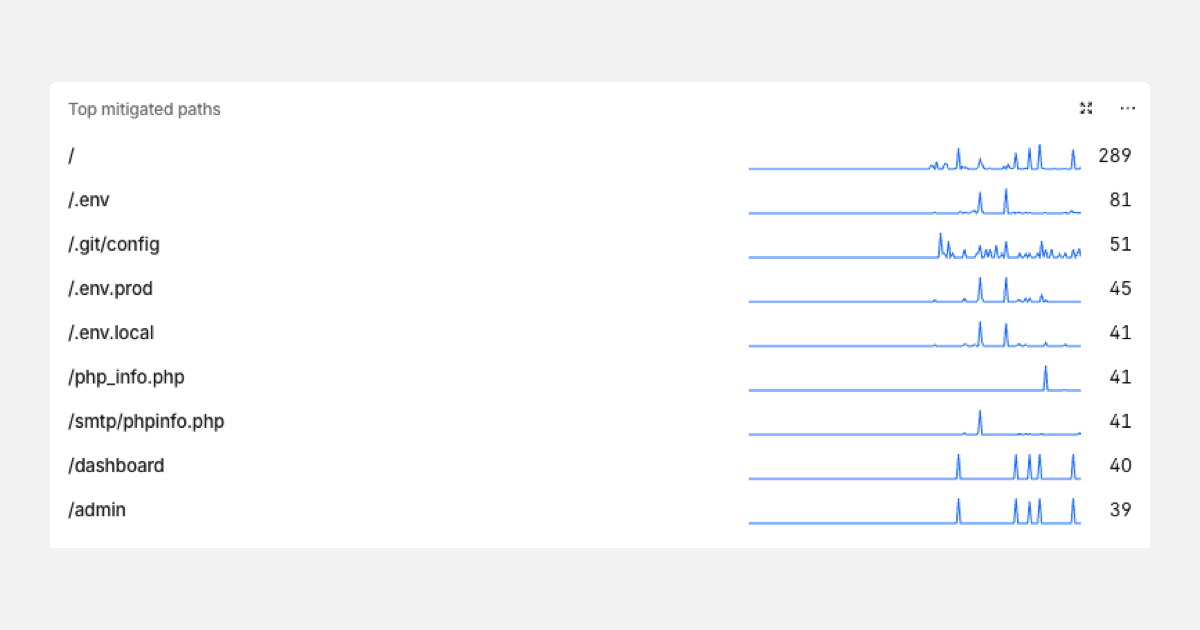
This screenshot is from the security dashboard of a new service I launched (it was Next and Rust, no PHP anywhere). It is the list of the most mitigated paths, meaning blocked ones. As fast as DNS started answering for it, several bots had already started sweeping several well-known URLs: /.git/config, /.env and the .env.prod and .env.local variations, /php_info.php, /smtp/phpinfo.php, /dashboard and /admin.
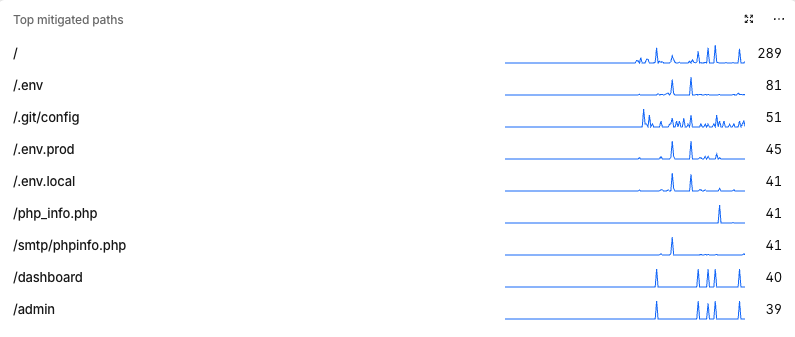 Top mitigated paths of a service that had just gone live (the numbers are blocked requests).
Notice what nobody there wants: no bot is interested in my product, and none of them knows my service is in Rust. They guess forgotten config files, credentials in the repository, debug pages of a stack I do not even use and admin panels, on everything that answers. It is cheap, it is mass-scale and it is automatic.
In short, the attacker knows your site is up, many times before you do. How? I did not measure which path gave me away, so take it as a hypothesis, but there are several: Certificate Transparency logs (every issued TLS certificate is published in a public log, and there are people listening to that stream in real time), passive DNS and continuous scanning of entire IP ranges. A wildcard certificate hides the subdomain name in the logs, which helps a little, but does not solve it.
You know that Cloud Run, Firebase Function or AWS Lambda you leave publicly open real quick just to receive a webhook? That artifact with super pretty HTML that Claude generates, full of sensitive data, which you make public to share the report you pulled with the folks at work? Well, that IS BEING READ as soon as it becomes available to everyone. The mechanism varies (a URL nobody knows takes longer to be found, but links leak through browser history, extensions, chats and logs), so the right question is not “who will find it?”, but “what does someone get if they find it?”.
If everything that goes live is read right away, the first defense is not leaving up what does not need to be up. On to the recipe.
Why the traditional way is no longer enough
I will give you my opinion, and that is all it is, an opinion from someone who sees the day to day and has no study to cite. Traditional tools (code scanning, SAST, DAST, dependency analysis) were designed for a world where the attacker was slow and so was the code. Neither is true anymore. Frontier models explore hypotheses nobody had time to explore, and on the other side we generate features and code with the same AIs, at enormous speed, understanding less and less of what was done. The more code nobody has read in production, the bigger the surface, and the less time for the defenders.
All of this leads to one path, and it is what gives this text its title: you will get hacked soon, and that is a fact. The useful question stops being “how do I avoid it?” and becomes “what happens in the next 60 minutes?”. I split the recipe into three moments: before, during and after.
1. Before production
Nothing here prevents the incident on its own. The goal is to reduce what the attacker can do, raise their cost, and above all make you notice fast. I grouped it the way I think about it, and with what I would do first in each one, so you leave here knowing where to start.
VPN and internal network: not everything needs to be on the internet
The cheapest way not to be scanned is not to show up in the scan. Admin panels, dashboards, Grafana, Swagger, debug and metrics endpoints (/actuator, /metrics, /debug/pprof), staging, databases, Redis, SSH: none of that needs a public IP, and /admin and /dashboard are already in the path list of the screenshot above.
The first layer is the VPN. WireGuard (directly, or on top of a service like Tailscale) gives each person their own key, which you revoke the day they leave the company, and access to internal services starts requiring being inside the network. More modern than that is identity-based access, called Zero Trust: instead of “whoever is on the network gets in”, it is “who are you, on which device, and are you allowed to access this?”. That is what Cloudflare Access, Tailscale, Google’s Identity-Aware Proxy and AWS Verified Access do, all in front of internal tools, with the company SSO and 2FA.
In the cloud, the basics are: databases and internal services in a private subnet (VPC) with no public IP, security groups closed by default (never 0.0.0.0/0 for SSH, MySQL, Postgres, Redis or MongoDB) and no bastion with an open port. SSM Session Manager on AWS, IAP TCP forwarding on Google Cloud and Azure Bastion on Azure give identity-based access without exposing port 22.
And the webhook, which really does need to be public? There the idea is to keep the surface minimal. The Cloud Run, Firebase Function or Lambda receives, verifies the provider’s signature (HMAC, like Stripe-Signature or X-Hub-Signature-256) and the message timestamp, rejects whatever does not match, drops the payload on a queue (Pub/Sub, SQS) and responds. No business logic, no secret besides the signing secret, and whatever does the real work stays private (--no-allow-unauthenticated on Cloud Run, a private invoker on Firebase Functions, AWS_IAM auth on the Lambda URL). When the provider publishes its source IP list, use that too.
The artifact, the report and the pretty dashboard with sensitive data follow the same rule: share with a login (the company SSO), with an expiration, or strip the sensitive data first. A “secret” link is not access control.
Finally, the limit: a VPN is not a silver bullet. VPN appliances have been a frequent target of exploitation, and a flat internal network, where whoever gets in sees everything, turns a leaked credential into access to every system. Segment the network, keep least privilege even inside it, use mTLS between services and log what happens in there too. An internal network is not a trusted place.
Who is calling your API?
An API gateway in front of everything gives you a single point for authentication, rate limiting, schema validation and logging. The fewer paths in, the better. I have used Akamai, Cloudflare and Kong, and sometimes a combination of more than one, in layers: Akamai or Cloudflare at the edge (CDN, WAF, bot manager, DDoS) and Kong inside, close to the services, handling authentication, per-consumer rate limits and plugins.
The WAF looks at HTTP and applies rules, and the bot manager decides whether the caller is a person or a script. The basic rules that work almost anywhere: block the HTTP methods your API does not use; block access to files that should never be public (/.env, /.git, what the screenshot above shows); rate limit the login (something like 5 attempts per 10 seconds, per IP); and challenge traffic that looks like a bot (on Cloudflare, for example, by the Bot Management score). A good part of this can be automated by connecting your API’s Swagger/OpenAPI: the specification already says which paths, methods, parameters and body formats exist, so the gateway and the WAF start accepting only that (whatever is not in the contract, like /.env, gets rejected right away). And if the contract is updated in the pipeline on every deploy, the rules follow the API without anyone touching them by hand, which makes it easier to keep everything up to date. Cloudflare has Schema Validation in API Shield, Akamai accepts API definitions in App & API Protector and Kong imports the spec with decK (deck file openapi2kong), for example. Start in log mode, because an outdated contract blocks legitimate traffic (one more reason to keep it up to date).
The bot manager goes beyond IP. The signals it usually combines: verified bots (Googlebot is confirmed by reverse DNS, not by User-Agent), TLS fingerprint (JA3/JA4, because curl and Chrome speak TLS differently), missing or extra headers (HeadlessChrome in the User-Agent, no Accept-Language) and behavior (one IP testing a thousand accounts, or a thousand IPs testing one account, which is credential stuffing). The response ladder is always the same: log, challenge, block.
Turnstile, reCAPTCHA Enterprise and proof of work challenges are a cost for the bot and almost none for the human. The classic mistake is validating only on the front end. The token has to be verified on the backend, calling the provider’s verification API with your secret.
Proof of work is the same idea without a third party: the server sends a challenge and the client has to find a nonce whose hash starts with N zeros. For a person it costs milliseconds, for a bot running millions of requests it gets expensive.
- Client integrity: on mobile, App Check, App Attest and Play Integrity tell your backend whether the caller really is your app, intact and on a trusted device. It is authority over the client, not just over the user.
- mTLS between services and TLS on everything, including internal traffic.
What can other people’s code do on your page?
CSP (Content Security Policy) is a header that tells the browser where the page may load scripts, images and frames from, and where it may make requests to. If an injected script tries to send data to a domain that is not on the list, the browser blocks it. Start in report mode (the Content-Security-Policy-Report-Only header) so you do not break the site.
SRI (Subresource Integrity) solves a different problem: it guarantees the file that arrived is exactly the one you reviewed. You put the hash in the integrity attribute of the <script> tag and, if a single byte changes, the browser refuses to execute it. The hash is generated with openssl dgst -sha384 -binary file.js | openssl base64 -A.
Both have limits, and AppsFlyer showed both. CSP does not help when the hijacked domain is exactly the one you authorized. SRI does not work with a dynamic SDK, which changes dozens of times a day. In those cases, at least know which script is running, where it comes from, and who approves what goes into the tag manager.
Obfuscation of client code swaps names, hides strings and scrambles the flow to make reading harder. It delays, it does not protect.
In JS there is javascript-obfuscator. In Flutter it is two flags (flutter build apk --obfuscate --split-debug-info=./symbols, keep the symbols folder to decode stack traces), and on native Android there is R8 (minifyEnabled true). After what we saw here, an AI undoes this in minutes, so treat it as friction and never as a control. And never, ever, put a secret in the client: if it is in the app or the bundle, it is public.
RASP (Runtime Application Self-Protection) is an agent that lives inside your app and watches what it is about to do, instead of only looking at the HTTP that arrived. The difference from the WAF is context: the WAF sees q=' OR 1=1-- arriving in a POST, while the RASP sees the SQL query the app is about to execute, with the person’s input mixed in, notices the structure of the query changed and blocks it.
On the backend it is an agent plugged in at startup (in Java, java -javaagent:/opt/rasp/agent.jar -jar app.jar), with hooks on SQL, file access, process execution and deserialization. There is OpenRASP (open source) and Datadog App and API Protection, among others. On mobile, RASP detects hooking (Frida), root, jailbreak, emulators and app tampering and reacts on the spot, and you can use freeRASP (open source, has a Flutter plugin) or solutions like Promon and Guardsquare.
Who can do what?
- Least privilege: each person and each service with the strictly necessary to do the job. That includes your CI.
- 2FA on everything that matters, preferably phishing resistant (passkey or hardware key). Remember the AppsFlyer registrar? Domain and DNS are your most valuable and most forgotten asset: enable transfer lock, restrict who accesses the account and protect the contact email.
- Production database only through code: auditable, versioned, reversible and with approval proportional to the type of query or change. Nobody opens a console and starts running things by hand.
Vault and automatic key rotation services deserve a paragraph. A secret that is never rotated is a secret that will leak one day without you knowing. HashiCorp Vault (and its open source fork OpenBao) goes further: dynamic secrets generate a new database credential for each consumer, with a TTL, and Vault revokes it on its own when the time is up.
AWS Secrets Manager has managed rotation (native for RDS and others, the rest runs in a Lambda of yours), Azure Key Vault has an automatic rotation policy for keys, and Google Secret Manager fires a Pub/Sub event on the schedule for your function to rotate. Infisical (open source) also has rotation for databases and IAM.
Rotating on its own only pays off if your app rereads the secret without needing a deploy. Remember Railway? That is exactly the bottleneck.
Watch your headers. They tend to reveal internal implementation, stack, server and framework versions, and every stack has a very characteristic signature. Run curl -sI https://yoursite.com and see what your service says about itself. The usual suspects: X-Powered-By: PHP/8.1.2 (PHP), X-Powered-By: Express (Node), X-Powered-By: Next.js (Next, and HTML full of /_next/static/), X-AspNet-Version (ASP.NET), Server: Apache-Coyote/1.1 (Tomcat, Java), X-Application-Context (Spring Boot 1.x) and the Link pointing to /wp-json/ (WordPress).
An X-Powered-By: PHP/8.1 is an invitation: the attacker does not need to test, they already know which CVE to try. How to hide it: expose_php = Off in PHP, server_tokens off; in nginx, ServerTokens Prod in Apache, app.disable("x-powered-by") in Express (or helmet) and poweredByHeader: false in next.config.js.
In Java, remove the Tomcat version from the error pages (server.xml) and clean up whatever is left at the gateway (in Kong, the response-transformer plugin with remove.headers). For Tomcat’s error pages, the ErrorReportValve with showServerInfo="false" does it.
And since you are touching headers anyway, turn on the ones that actually protect: Strict-Transport-Security, X-Content-Type-Options: nosniff, Referrer-Policy and Permissions-Policy.
Can you see what is happening?
- Structured logs, from the start. When the incident happens you will ask “who accessed what, and when?”, and the answer needs to be a query, not archaeology.
- IaC (Terraform) for infrastructure and Pulumi (or equivalent) so alerts become code too: versioned, reviewed, reproducible.
- RUM (real user monitoring): it is how you notice the vendor script that started making strange requests in real people’s browsers.
- Monitor mentions of your company on Twitter, Reddit and specialized forums, and if you have the stomach, even in more hidden groups. Note that in the AppsFlyer case the first public sign appeared outside the company.
Do you know what you are running and can you swap it fast?
- An inventory of what is in production, with versions. The PHP advisory says versions 8.1 and older no longer receive updates from the project. How many of your services run that today? If the answer is “I need to look it up”, that is your first task.
- Single-pane observability as a living inventory. In Datadog, for example, you see the clients with RUM, go through APM and logs and reach infrastructure and the database (with Database Monitoring), all in the same tool. The Service Map draws the interaction between systems and shows the bottlenecks on its own, and the Software Catalog lists every service with its owner and dependencies. With the
env,serviceandversiontags (unified service tagging) it is easy to get a big picture of the whole company, without someone having to draw it by hand like the Mayans and Aztecs. Just remember the tool shows what you instrumented: the runtime version (the PHP 8.1 in this case) only becomes a filter if you expose it as a tag. New Relic, Dynatrace and the Grafana stack go down the same path. - A rotation runbook: a list of every credential, where it lives, who can rotate it and how. The closer to “one command”, the better. Test it. And think about what happens if your provider has a stuck pipeline, because that happened to me today.
2. The incident
When it happens you have four questions, and the order matters.
- Detection: how was it discovered? Was it you, a vendor, a researcher or a user complaining on a forum? That says a lot about the maturity of your monitoring. In the AppsFlyer case, the company says it detected the anomaly at 00:22 UTC on the 10th, but researchers had already seen the payload on the night of the 9th.
- Containment: has the vulnerability been fixed? Before any refined investigation, stop the bleeding: isolate, block, shut down, roll back. If there is only a partial mitigation (like the ones in the PHP advisory, which the authors themselves say “do not make an installation safe”), treat the incident as still open.
- Impact: how long was it exploited and what was compromised? The answers here tend to be uncomfortable. AppsFlyer talks about a little over nine hours on the morning of the 10th (00:31 to 09:47 UTC); independent researchers suspect the window was larger, between the night of the 9th and the 11th. Two sources, two answers, and the text from whoever suffered the incident is always the most optimistic. Start from the worst case your logs cannot rule out.
- Prioritization: what needs to be rotated and who needs to be told? Rotate first what gives the most access (cloud and database credentials, signing keys, payment tokens) and then the rest. Tell whoever has data at risk, and if you handle personal data of Brazilians, LGPD requires notifying the ANPD and the data subjects, on a short deadline. Do not leave learning this for the middle of the incident.
3. After the incident
Post mortem. Timeline of events, what was done to contain it, next steps, what we learned and which guardrails keep it from happening again. Write it without looking for a culprit in the text, because the goal is to understand the system that allowed the mistake. That is not the same as having no accountability, and in a moment I will explain the difference.
Transparency. Communicate with everyone involved, directly and indirectly: customers, partners, vendors, team. Fast, clear, no adjectives, saying what you know and what you do not know yet. Railway, even in the middle of the chaos, published the recommendation (rotate everything) while still investigating. You can criticize the delay, but that is the right path.
Accountability. Yes, I really wrote that. In the golden age of software engineering, in the startup boom, when firing people was forbidden and we could go to the office in shorts and grab a free beer from the full fridge at 2pm, this was taboo, if not outright forbidden. I consider it essential. Measures need to be taken regarding people and systems, whatever opened the gap. Accountability does not mean firing (sometimes it does, like when it is intentional), it is part of maturing the process: reducing that person’s privileges, going through the UNBEARABLE mandatory refresher training that the infosec team loves so much (and that does nothing, ok?), moving to a team where they are less exposed. This is part of the maturing of the professional and of the company. With proper communication, feedback and respect, of course. But it is essential and has always been left aside.
And chaos engineering? Everything I listed above only counts if it works for real at the moment. The only way to know is to cause a controlled incident in-house and watch how the team behaves in a crisis: knock out a credential on purpose, simulate a compromised vendor, run a security game day where someone from the team (or from outside) really tries to get in. You will find out the runbook is outdated, nobody knows who has the registrar password, the alert reaches no one at 2am. It is much better to find that out on a Tuesday afternoon than during the real incident (and never on a Friday, neither deploy nor incident).
Okay, Lukita, but if I am going to get hacked anyway, why spend time and money on all of this? Because the goal was never to reach zero. It is to shrink the blast radius and the time between the attack and your reaction. Whoever went through this with a tested rotation runbook and logs that answer questions spends a few hours. Whoever went through it without them spends weeks, and is still not sure what was lost.
Worth remembering
This guide does not pretend to be complete, nor absolute truth. I wrote it on a day with an open incident, with the facts as they were published in the sources below, and several of them are likely to change (Railway’s own incident is still ongoing). The reading that traditional tools do not keep up with the pace of frontier models is my opinion, with no study behind it. And what if a company that does everything I listed still gets hacked? The obvious answer is: I don’t know!
Remember when I said at the start that I already know I will have the long job of rotating several keys once Railway releases? Yes, that is exactly it. The difference between suffering an incident and being caught off guard by one is having asked, beforehand, “what if it happens right now?”. If you want to talk it over, disagree with an item or tell me what your team would do in the first 60 minutes, leave a comment here.
Sources
- PHP: security advisory of 2026-10-21
- Wiz Research: PHP2Shell
- Railway: security disclosure of 2026-10-21 and incident page
- AppsFlyer: March 2026 incident FAQ
- BleepingComputer: AppsFlyer Web SDK used to spread crypto stealer JavaScript code
- cside: technical analysis of the payload
- Profero: Hijacked at the Source
- Hacker News thread and the script paste analyzed by Gemini and Claude